

Functions & Modules#
Introduction#
In Python, a function is a block of organized, reusable (DRY- Don’t Repeat Yourself) code with a name that is used to perform a single, specific task. It can take arguments and returns the value.
Functions help break our program into smaller and modular chunks.
Built-in functions
The functions which are come along with Python itself.
Examples:
range(),print(),input(),type(),id(),eval()etc.User-defined function
Functions which are created by programmer explicitly according to the requirement
Syntax:
def function_name(parameter1, parameter2):
    """docstring"""
    # function body
    # write some action
return value

Functions without parameters and return value#
# Example 1:

def greet():
    print("Welcome to Python for Data Science")

# call function using its name
greet()
Welcome to Python for Data Science
Functions with return value#
# Example 2:

def generate_full_name ():
    first_name = 'Anukool'
    last_name = 'Chaturvedi'
    space = ' '
    full_name = first_name + space + last_name
    return full_name
print(generate_full_name())
Functions with parameters#
# Example 1:  with 1 parameter and no return value

def sum_of_numbers(n):
    total = 0
    for i in range(n+1):
        total+=i
    print(total)
print(sum_of_numbers(10))  # 55
print(sum_of_numbers(100)) # 5050
55
None
5050
None
# Example 2:  With multiple parameters & return values

def sum_two_numbers (num_one, num_two):  # two parameter
    sum = num_one + num_two
    return sum
print('Sum of two numbers: ', sum_two_numbers(1, 9))
Sum of two numbers: 10
If we do not return a value with a function, then our function is returning None by default.
Returning multiple values#
In Python you can also return multiple values from a function. Use the return statement by separating each expression by a comma.
# Example 1:

def arithmetic(num1, num2):
    add = num1 + num2
    sub = num1 - num2
    multiply = num1 * num2
    division = num1 / num2
    # return four values
    return add, sub, multiply, division

a, b, c, d = arithmetic(10, 2)  # read four return values in four variables

print("Addition: ", a)
print("Subtraction: ", b)
print("Multiplication: ", c)
print("Division: ", d)
Addition:  12
Subtraction:  8
Multiplication:  20
Division:  5.0
Passing default values#
You can also pass default values to a function. If the value is not provided, the default value will be used
# Example:

def calculate_age (birth_year,current_year = 2021):
    age = current_year - birth_year
    return age;
print('Age: ', calculate_age(1821))
Age: 200
Docstrings#
docstring is short for documentation string. It is a descriptive text (like a comment) written by a programmer to let others know what block of code does.
Although optional, documentation is a good programming practice.
It is being declared using triple single quotes ''' ''' or triple-double quote """ """ so that docstring can extend up to multiple lines.
We can access docstring using doc attribute __doc__ for any object like list, tuple, dict, and user-defined function, etc.
# Example

def swap(x, y):
    # Docstring
    """
    This function swaps the value of two variables
    """
    temp = x;  # value of x will go inside temp
    x = y;     # value of y will go inside x
    y = temp;  # value of temp will go inside y
    print("value of x is:", x)
    print("value of y is:", y)
    return     # "return" is optional

x = 6
y = 9
swap(x, y)     #call function
value of x is: 9
value of y is: 6
print(swap.__doc__)
This function swaps the value of two variables
Variable scope#
When we define a function with variables, then those variables scope is limited to that function.
In Python, the scope of a variable is the portion of a program where the variable is declared.
Parameters and variables defined inside a function are not visible from outside the function. Hence, it is called the variable’s local scope.
Global#
In Python, a variable declared outside of the function or in global scope is known as a global variable. This means that a global variable can be accessed inside or outside of the function.
# Example

x = "global"

def fun():
    print("x inside:", x)

fun()
print("x outside:", x)
x inside: global
x outside: global
We can’t change the value of a global variable inside a function.
# Example

x = "global"

def fun():
    x = x * 2
    print(x)

fun()
---------------------------------------------------------------------------
UnboundLocalError                         Traceback (most recent call last)
Cell In[15], line 9
      6     x = x * 2
      7     print(x)
----> 9 fun()

Cell In[15], line 6, in fun()
      5 def fun():
----> 6     x = x * 2
      7     print(x)

UnboundLocalError: cannot access local variable 'x' where it is not associated with a value
To make this work, we can use global keyword. global keyword allows you to modify the variable outside of the current scope. It is used to create a global variable and make changes to the variable in a local context.
# Modify a global variable inside a function

x = "global"

def fun():
    global x
    x = x * 2
    print(x)

fun()
globalglobal
Local#
A variable declared inside the function’s body or in the local scope is known as a local variable.
# Example: fun2 can't access loc_var defined in fun1, as it is local to fun1

def fun1():
    loc_var = 999   # local variable
    print("Value is :", loc_var)

def fun2():
    print("Value is :", loc_var)

fun1()
fun2()
Value is : 999
---------------------------------------------------------------------------
NameError                                 Traceback (most recent call last)
Cell In[19], line 11
      8     print("Value is :", loc_var)
     10 fun1()
---> 11 fun2()

Cell In[19], line 8, in fun2()
      7 def fun2():
----> 8     print("Value is :", loc_var)

NameError: name 'loc_var' is not defined
Aruguments#
In Python, there are other ways to define a function that can take variable number of arguments.
Three different forms of this type are described below:
Default Arguments
Keyword Arguments
Arbitrary/Variable-length Arguments
Default Arguments#
The default argument is a parameter that has a default value. If the value is not provided, the default value will be used.
# Example:

def greet(name, msg="Good morning!"):  # two arguments: `name` is fixed arg and 'msg' is variable arg

    print("Hello", name + ', ' + msg)


greet("Alan")
greet("Bruce", "How do you do?")
greet("Carson","Good night!")
Hello Alan, Good morning!
Hello Bruce, How do you do?
Hello Carson, Good night!
Keyword Arguments#
A keyword argument is an argument value, passed to function preceded by the variable name and an equals sign.
This allows you to skip arguments or place them out of order because the Python interpreter is able to use the keywords provided to match the values with parameters.
# Example 1:

greet("Eric", "How do you do?")

# 2 keyword arguments
greet(name = "Eric",msg = "How do you do?")

# 2 keyword arguments (out of order)
greet(msg = "How do you do?",name = "Eric")

# 1 positional, 1 keyword argument
greet("Eric", msg = "How do you do?")
Hello Eric, How do you do?
Hello Eric, How do you do?
Hello Eric, How do you do?
Hello Eric, How do you do?
As we can see, we can mix positional arguments with keyword arguments during a function call. But we must keep in mind that keyword arguments must follow positional arguments.
Having a positional argument after keyword arguments will result in errors.
In keyword arguments, order of argument doesn’t not matter, but the number of arguments must match. Otherwise, we will get an error.
greet(name="Eric","How do you do?") # Will result in an error
  Cell In[22], line 1
    greet(name="Eric","How do you do?")  # Will result in an error
                                      ^
SyntaxError: positional argument follows keyword argument
Arbitrary/Variable-length Arguments#
Sometimes, we do not know in advance the number of arguments that will be passed into a function. Python allows us to handle this kind of situation through function calls with an arbitrary number of arguments.
We can pass any number of arguments to this function. Internally all these values are represented in the form of a tuple.
In the function definition, we use an asterisk * before the parameter name to denote this kind of argument. For example:
# Example 1:

def greet(*names):
    """This function greets all the person in the names tuple."""
    # names is a tuple with arguments
    for name in names:
        print("Hello", name)

greet("Gary", "Hank", "Ivan", "John")
Hello Gary
Hello Hank
Hello Ivan
Hello John
Function as a Parameter#
In Python, we can pass a function as a parameter to another function.
# Example 1: You can pass functions around as parameters

def square_number (n):
    return n * n
def do_something(f, x):
    return f(x)
print(do_something(square_number, 3)) # 27
9
Recursion#
Recursion is the process of defining something in terms of itself.
A physical world example would be to place two parallel mirrors facing each other. Any object in between them would be reflected recursively.
In Python, we know that a function can call other functions. It is even possible for the function to call itself. These types of construct are termed as recursive functions.
The following image shows the working of a recursive function called recurse.

# Example 1:

def factorial(n):
    """This is a recursive function to find the factorial of an integer"""

    if n == 1:
        return 1
    else:
        return (n * factorial(n-1))  # 3 * 2 * 1 = 6


num = 3
print("The factorial of", num, "is", factorial(num))
When we call this function with a positive integer, it will recursively call itself by decreasing the number.
Each function multiplies the number with the factorial of the number below it until it is equal to one. This recursive call can be explained in the following steps.
factorial(3)          # 1st call with 3
3 * factorial(2)      # 2nd call with 2
3 * 2 * factorial(1)  # 3rd call with 1
3 * 2 * 1             # return from 3rd call as number=1
3 * 2                 # return from 2nd call
6                     # return from 1st call
Let’s look at an image that shows a step-by-step process of what is going on:

Our recursion ends when the number reduces to 1. This is called the base condition.
Every recursive function must have a base condition that stops the recursion or else the function calls itself infinitely.
Anonymous / Lambda Functions#
In Python, an anonymous function is a function that is defined without a name.
While normal functions are defined using the def keyword in Python, anonymous functions are defined using the lambda keyword.
For example: lambda n:n+n
Anonymous functions make the code very concise and easy to read
Hence, anonymous functions are also called lambda functions.
Lambda forms can take any number of arguments but return just one value in the form of an expression. They cannot contain commands or multiple expressions.
An anonymous function cannot be a direct call to print because lambda requires an expression.
lambdafunctions have their own local namespace and cannot access variables other than those in their parameter list and those in the global namespace.Although it appears that lambdas are a one-line version of a function, they are not equivalent to inline statements in C or C++, whose purpose is to stack allocation by passing function, during invocation for performance reasons.
Syntax:
lambda argument_list: expression
# Example 1: Program for even numbers without lambda function

def even_numbers(nums):
    even_list = []
    for n in nums:
        if n % 2 == 0:
            even_list.append(n)
    return even_list

num_list = [10, 9, 16, 78, 2, 3, 7, 1]
ans = even_numbers(num_list)
print("Even numbers are:", ans)
Even numbers are: [10, 16, 78, 2]
# Example 1: Program for even number with a lambda function

l = [10, 9, 16, 78, 2, 3, 7, 1]
even_nos = list(filter(lambda x: x % 2 == 0, l))
print("Even numbers are: ", even_nos)
Even numbers are: [10, 16, 78, 2]
x is the argument of the function, x % 2 is the expression
Modules#
Module containing a set of codes or a set of functions which can be included to an application.
Modules refer to the Python file, which contains Python code like Python statements, classes, functions, variables, etc. A file with Python code is defined with extension .py
For example: In main.py, where the main is the module name.
In Python, large code is divided into small modules. The benefit of modules is, it provides a way to share reusable functions.
Advantage
Reusability: Module can be used in some other python code. Hence it provides the facility of code reusability.
Categorization: Similar type of attributes can be placed in one module.
Creating a module#
A file containing Python code, for example: example.py, is called a module, and its module name would be example.
Let us create a module. Type the following and save it as example.py.
# Python Module example

>>> def add(a, b):
>>>     """This program adds two numbers and return the result"""
>>>     result = a + b
>>>     return result
Importing a module#
We can import the definitions inside a module to another module or the interactive interpreter in Python.
👉 We use the import keyword to do this.
# Importing a module
>>> import example
>>> example.add(2, 3)
👉 You can also import specific objects from a module. For example:
>>> from example import add
>>> add(2, 3)
👉 You can access submodules and import specific objects using the dot operator. For example:
>>> from example.submodule import add
>>> add(2, 3)
👉 You can also import all objects from a module. For example:
>>> from example import *
>>> add(2, 3)
👉 You can import multiple objects from a module. For example:
>>> from example import add, sub
>>> add(2, 3)
👉 You can give a new name or alias to the imported objects.
>>> import example as e
>>> e.add(2, 3)
Module path#
While importing a module, Python looks at several places. Interpreter first looks for a built-in module. Then(if built-in module not found), Python looks into a list of directories defined in sys.path. The search is in this order.
The current directory.
PYTHONPATH(an environment variable with a list of directories).The installation-dependent default directory.
>>>import sys
>>>sys.path
Built-in modules#
Built-in modules are pre-installed with Python. You can see all built-in modules with the help('modules') method
help('modules')
Please wait a moment while I gather a list of all available modules...
/opt/homebrew/Caskroom/miniconda/base/envs/ml-notes/lib/python3.12/pkgutil.py:78: UserWarning: The numpy.array_api submodule is still experimental. See NEP 47.
  __import__(info.name)
IPython             aifc                ipykernel_launcher  sched
PIL                 alabaster           itertools           secrets
__future__          antigravity         jedi                select
__hello__           appnope             jinja2              selectors
__phello__          argparse            json                setuptools
_abc                array               jsonschema          shelve
_aix_support        ast                 jsonschema_specifications shlex
_ast                asttokens           jupyter             shutil
_asyncio            asyncio             jupyter_book        signal
_bisect             atexit              jupyter_cache       site
_blake2             attr                jupyter_client      six
_bz2                attrs               jupyter_core        smtplib
_codecs             audioop             keyword             sndhdr
_codecs_cn          babel               kiwisolver          snowballstemmer
_codecs_hk          base64              latexcodec          socket
_codecs_iso2022     bdb                 lib2to3             socketserver
_codecs_jp          binascii            linecache           soupsieve
_codecs_kr          bisect              linkify_it          sphinx
_codecs_tw          bs4                 locale              sphinx_book_theme
_collections        builtins            logging             sphinx_comments
_collections_abc    bz2                 lzma                sphinx_copybutton
_compat_pickle      cProfile            mailbox             sphinx_design
_compression        calendar            mailcap             sphinx_external_toc
_contextvars        certifi             markdown_it         sphinx_jupyterbook_latex
_crypt              cgi                 markupsafe          sphinx_multitoc_numbering
_csv                cgitb               marshal             sphinx_thebe
_ctypes             charset_normalizer  math                sphinx_togglebutton
_ctypes_test        chunk               matplotlib          sqlalchemy
_curses             click               matplotlib_inline   sqlite3
_curses_panel       cmath               mdit_py_plugins     sre_compile
_datetime           cmd                 mdurl               sre_constants
_dbm                code                mimetypes           sre_parse
_decimal            codecs              mmap                ssl
_distutils_hack     codeop              modulefinder        stack_data
_elementtree        collections         multiprocessing     stat
_functools          colorsys            myst_nb             statistics
_hashlib            comm                myst_parser         string
_heapq              compileall          nbclient            stringprep
_imp                concurrent          nbformat            struct
_io                 configparser        nest_asyncio        subprocess
_json               contextlib          netrc               sunau
_locale             contextvars         nis                 symtable
_lsprof             contourpy           nntplib             sys
_lzma               copy                ntpath              sysconfig
_markupbase         copyreg             nturl2path          syslog
_md5                crypt               numbers             tabnanny
_multibytecodec     csv                 numpy               tabulate
_multiprocessing    ctypes              opcode              tarfile
_opcode             curses              operator            telnetlib
_operator           cycler              optparse            tempfile
_osx_support        dataclasses         os                  termios
_pickle             datetime            packaging           test
_posixshmem         dateutil            pandas              tests
_posixsubprocess    dbm                 parso               textwrap
_py_abc             debugpy             pathlib             this
_pydatetime         decimal             pdb                 threading
_pydecimal          decorator           pexpect             time
_pyio               difflib             pickle              timeit
_pylong             dis                 pickleshare         tkinter
_queue              doctest             pickletools         token
_random             docutils            pip                 tokenize
_scproxy            email               pipes               tomllib
_sha1               encodings           pkg_resources       tornado
_sha2               ensurepip           pkgutil             trace
_sha3               enum                platform            traceback
_signal             errno               platformdirs        tracemalloc
_sitebuiltins       exceptiongroup      plistlib            traitlets
_socket             executing           poplib              tty
_sqlite3            fastjsonschema      posix               turtle
_sre                faulthandler        posixpath           turtledemo
_ssl                fcntl               pprint              types
_stat               filecmp             profile             typing
_statistics         fileinput           prompt_toolkit      typing_extensions
_string             fnmatch             pstats              tzdata
_strptime           fontTools           psutil              uc_micro
_struct             fractions           pty                 unicodedata
_symtable           ftplib              ptyprocess          unittest
_sysconfigdata__darwin_darwin functools           pure_eval           urllib
_sysconfigdata_arm64_apple_darwin20_0_0 gc                  pwd                 urllib3
_testbuffer         genericpath         py_compile          uu
_testcapi           getopt              pybtex              uuid
_testclinic         getpass             pybtex_docutils     venv
_testimportmultiple gettext             pyclbr              warnings
_testinternalcapi   glob                pydata_sphinx_theme wave
_testmultiphase     graphlib            pydoc               wcwidth
_testsinglephase    grp                 pydoc_data          weakref
_thread             gzip                pyexpat             webbrowser
_threading_local    hashlib             pygments            wheel
_tkinter            heapq               pylab               wsgiref
_tokenize           hmac                pyparsing           xdrlib
_tracemalloc        html                pytz                xml
_typing             http                queue               xmlrpc
_uuid               idlelib             quopri              xxlimited
_warnings           idna                random              xxlimited_35
_weakref            imagesize           re                  xxsubtype
_weakrefset         imaplib             readline            yaml
_xxinterpchannels   imghdr              referencing         zipapp
_xxsubinterpreters  importlib           reprlib             zipfile
_xxtestfuzz         importlib_metadata  requests            zipimport
_yaml               inspect             resource            zipp
_zoneinfo           io                  rlcompleter         zlib
a11y_pygments       ipaddress           rpds                zmq
abc                 ipykernel           runpy               zoneinfo

Enter any module name to get more help.  Or, type "modules spam" to search
for modules whose name or summary contain the string "spam".
dir()#
We can use the dir() function to find out names that are defined inside a module
import sys
dir(sys)
['__breakpointhook__',
 '__displayhook__',
 '__doc__',
 '__excepthook__',
 '__interactivehook__',
 '__loader__',
 '__name__',
 '__package__',
 '__spec__',
 '__stderr__',
 '__stdin__',
 '__stdout__',
 '__unraisablehook__',
 '_base_executable',
 '_clear_type_cache',
 '_current_exceptions',
 '_current_frames',
 '_debugmallocstats',
 '_framework',
 '_getframe',
 '_getframemodulename',
 '_git',
 '_home',
 '_setprofileallthreads',
 '_settraceallthreads',
 '_stdlib_dir',
 '_xoptions',
 'abiflags',
 'activate_stack_trampoline',
 'addaudithook',
 'api_version',
 'argv',
 'audit',
 'base_exec_prefix',
 'base_prefix',
 'breakpointhook',
 'builtin_module_names',
 'byteorder',
 'call_tracing',
 'copyright',
 'deactivate_stack_trampoline',
 'displayhook',
 'dont_write_bytecode',
 'exc_info',
 'excepthook',
 'exception',
 'exec_prefix',
 'executable',
 'exit',
 'flags',
 'float_info',
 'float_repr_style',
 'get_asyncgen_hooks',
 'get_coroutine_origin_tracking_depth',
 'get_int_max_str_digits',
 'getallocatedblocks',
 'getdefaultencoding',
 'getdlopenflags',
 'getfilesystemencodeerrors',
 'getfilesystemencoding',
 'getprofile',
 'getrecursionlimit',
 'getrefcount',
 'getsizeof',
 'getswitchinterval',
 'gettrace',
 'getunicodeinternedsize',
 'hash_info',
 'hexversion',
 'implementation',
 'int_info',
 'intern',
 'is_finalizing',
 'is_stack_trampoline_active',
 'last_traceback',
 'last_type',
 'last_value',
 'maxsize',
 'maxunicode',
 'meta_path',
 'modules',
 'monitoring',
 'orig_argv',
 'path',
 'path_hooks',
 'path_importer_cache',
 'platform',
 'platlibdir',
 'prefix',
 'ps1',
 'ps2',
 'ps3',
 'pycache_prefix',
 'set_asyncgen_hooks',
 'set_coroutine_origin_tracking_depth',
 'set_int_max_str_digits',
 'setdlopenflags',
 'setprofile',
 'setrecursionlimit',
 'setswitchinterval',
 'settrace',
 'stderr',
 'stdin',
 'stdlib_module_names',
 'stdout',
 'thread_info',
 'unraisablehook',
 'version',
 'version_info',
 'warnoptions']
os()#
Used to automatically perform many operating system tasks. It provides functions for creating, changing current working directory, and removing a directory (folder), fetching its contents, changing and identifying the current directory.
# Example 1:

# import the module
import os
# Getting current working directory
os.getcwd()
sys()#
Used to access system specific parameters and functions. It provides access to some variables used or maintained by the interpreter and to functions that interact strongly with the interpreter.
import sys
sys.path
string()#
A string module is a useful module for working with text. It contains a set of functions that are used to perform certain operations on characters. This module has pre-defined functions like capwords, ascii_letters, etc.
# Example 1:

from string import *
print(capwords("hello world")) #capitalizes the first letter of each words
print(ascii_letters) #prints all lowercase and uppercase letters
Hello World
abcdefghijklmnopqrstuvwxyzABCDEFGHIJKLMNOPQRSTUVWXYZ
random()#
The random module is used to generate the random numbers. It provides the following two built in functions:
Function |
Description |
|---|---|
|
It returns a random number between 0.0 and 1.0 where 1.0 is exclusive. |
|
It returns a random number between x and y where both the numbers are inclusive. |
# Example 1:

from random import *
print(randint(10, 20)) #prints a random number between the given range

list1 = [30, 23, 45, 16, 89, 56]
print(choice(list1)) #prints a random element from the given iterator

print(uniform(10, 20)) #prints a random float number between two given values
10
30
14.78589902230161
math()#
The math module is used to perform mathematical operations. It provides some pre-defined mathematical functions like sqrt, factorial, etc.
Function |
Description |
|---|---|
|
It returns the next integer number of the given number. |
|
It returns the Square root of the given number. |
|
It returns the natural logarithm e raised to the given number. |
|
It returns the previous integer number of the given number. |
|
It returns the previous integer number of the given number. |
|
It returns baseto raised to the exp power. |
|
It returns sine of the given radian. |
|
It returns cosine of the given radian. |
|
It returns tangent of the given radian. |
from math import *
print(sqrt(16)) # prints the square root of the value 16 in the form of a floating-point value
print(factorial(5)) # prints the factorial of the value 5
4.0
120
There are alot more builtin and user defined modules, you can read more about them here
Packages#
We want to divide our code base into clean, efficient modules using Python packages.
We don’t usually store all of our files on our computer in the same location. We use a well-organized hierarchy of directories for easier access.
Similar files are kept in the same directory, for example, we may keep all the songs in the “music” directory. Analogous to this, Python has packages for directories and modules for files.
As our application program grows larger in size with a lot of modules, we place similar modules in one package and different modules in different packages. This makes a project (program) easy to manage and conceptually clear.
Similarly, as a directory can contain subdirectories and files, a Python package can have sub-packages and modules.
A directory must contain a file named __init__.py in order for Python to consider it as a package. This file can be left empty but we generally place the initialization code for that package in this file.
Here is an example. Suppose we are developing a game. One possible organization of packages and modules could be as shown in the figure below.
|
|---|
Package Module Structure in Python Programming |
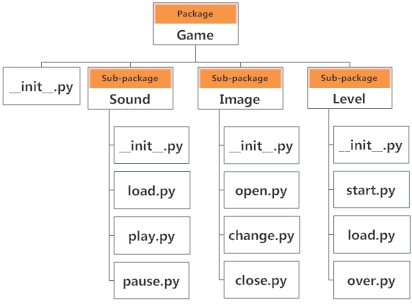
We can import modules from packages using the dot . operator.
For example, if we want to import the start module in the above example, it can be done as follows:
>>>import Game.Level.start
Now, if this module contains a function named select_difficulty(), we must use the full name to reference it.
>>>Game.Level.start.select_difficulty(2)
If this construct seems lengthy, we can import the module without the package prefix as follows:
>>>from Game.Level import start
We can now call the function simply as follows:
>>>start.select_difficulty(2)
Another way of importing just the required function (or class or variable) from a module within a package would be as follows:
>>>from Game.Level.start import select_difficulty
Now we can directly call this function.
>>>select_difficulty(2)
Although easier, this method is not recommended. Using the full namespace avoids confusion and prevents two same identifier names from colliding.
While importing packages, Python looks in the list of directories defined in sys.path, similar as for module search path.