
Building Reliable Local Agents with LangGraph, LLaMA3, and Elasticsearch#
This post details the construction of a robust local agent, leveraging the capabilities of LangGraph, LLaMA3, and Elasticsearch. We address the challenge of creating reliable local agents, which often suffer from inconsistencies and inaccuracies due to their reliance on limited context. This blog post is a companion piece to the original article published by Elastic Search Labs, which can be found here: https://www.elastic.co/search-labs/blog/local-rag-agent-elasticsearch-langgraph-llama3. Our solution employs LangGraph to orchestrate the agent’s workflow, LLaMA3 for its reasoning and generation capabilities, and Elasticsearch for efficient and accurate information retrieval. This combination allows for a more dependable agent, capable of handling complex tasks with improved performance.
Building the RAG Pipeline with LangGraph#
This section details the implementation of the RAG pipeline using LangGraph, focusing on indexing data into Elasticsearch, creating a retrieval grader, and setting up the generator for answering user questions.
First, we will need to load, process, and index our targetted data into our Vector Store. In this tutorial, we will be indexing documents from these respective Blog posts:
“https://lilianweng.github.io/posts/2023-03-15-prompt-engineering/”,
“https://lilianweng.github.io/posts/2023-10-25-adv-attack-llm/”,
Into our vector store, which will then add as a data source for our RAG implementation, as the index is the key component of our RAG flow without which we won’t be able to retrive the documents.
# Index

from langchain_community.document_loaders import WebBaseLoader
from langchain_nomic.embeddings import NomicEmbeddings
from langchain_elasticsearch import ElasticsearchStore
from langchain_text_splitters import RecursiveCharacterTextSplitter

urls = [
    "https://lilianweng.github.io/posts/2023-06-23-agent/",
    "https://lilianweng.github.io/posts/2023-03-15-prompt-engineering/",
    "https://lilianweng.github.io/posts/2023-10-25-adv-attack-llm/",
]

docs = [WebBaseLoader(url).load() for url in urls]
docs_list = [item for sublist in docs for item in sublist]

text_splitter = RecursiveCharacterTextSplitter.from_tiktoken_encoder(
    chunk_size=250, chunk_overlap=0
)
doc_splits = text_splitter.split_documents(docs_list)
documents=doc_splits

embeddings=NomicEmbeddings(model="nomic-embed-text-v1.5", inference_mode="local")

db = ElasticsearchStore.from_documents(
    documents,
    embeddings,
    es_url="https://pratikrana23.es.us-central1.gcp.cloud.es.io",
    es_user="elastic",
    es_password="9Y9Xwz0J65gPCbJeUoSPdzHO",
    index_name="rag-elastic",
)
retriever = db.as_retriever()
Code Description:
A list of URLs is defined, pointing to three different blog posts on Lilian Weng’s website.
The content from each URL is loaded using
WebBaseLoader, and the result is stored in thedocslist.The loaded documents are stored as a list of lists (each containing one or more documents). These lists are flattened into a single list using a list comprehension.
The
RecursiveCharacterTextSplitteris initialized with a specific chunk size (250 characters) and no overlap. This is used to split the documents into smaller chunks.The split chunks are stored in the
documentsvariable.An instance of
NomicEmbeddingsis created to generate embeddings for the document chunks. The model used is specified as"nomic-embed-text-v1.5", and inference is done locally.The documents, along with their embeddings, are stored in an Elasticsearch database. The connection details (URL, username, password) and the index name are provided.
Finally, a retriever object is created from the Elasticsearch database, which can be used to query and retrieve documents based on their embeddings.
Once we index our respective documents into the data store, we will need to create a grader that evaluates the relevance of our retrieved document to a given user question. We will leverage llama3 to perform this task. The prompt instructs the model to grade a document and return a JSON object with a score of yes or no.
# Retrieval Grader

from langchain_community.chat_models import ChatOllama
from langchain_core.output_parsers import JsonOutputParser
from langchain_core.prompts import PromptTemplate

# LLM
llm = ChatOllama(model=local_llm, format="json", temperature=0)

prompt = PromptTemplate(
    template="""<|begin_of_text|><|start_header_id|>system<|end_header_id|> You are a grader assessing relevance
    of a retrieved document to a user question. If the document contains keywords related to the user question,
    grade it as relevant. It does not need to be a stringent test. The goal is to filter out erroneous retrievals. \n
    Give a binary score 'yes' or 'no' score to indicate whether the document is relevant to the question. \n
    Provide the binary score as a JSON with a single key 'score' and no premable or explanation.
     <|eot_id|><|start_header_id|>user<|end_header_id|>
    Here is the retrieved document: \n\n {document} \n\n
    Here is the user question: {question} \n <|eot_id|><|start_header_id|>assistant<|end_header_id|>
    """,
    input_variables=["question", "document"],
)

retrieval_grader = prompt | llm | JsonOutputParser()
question = "agent memory"
docs = retriever.invoke(question)
doc_txt = docs[1].page_content
print(retrieval_grader.invoke({"question": question, "document": doc_txt}))
Code Description:
The
ChatOllamamodel is instantiated with a specific configuration. The model is set to output responses in JSON format with a temperature of 0, meaning the output is deterministic (no randomness).A
PromptTemplateis defined, which sets up the instructions that will be sent to the LLM. This prompt instructs the LLM to act as a grader that assesses whether a retrieved document is relevant to a user’s question.The grader’s task is simple: if the document contains keywords related to the user question, it should return a binary score (
yesorno) indicating relevance.The response is expected in a JSON format with a single key
score.The
retrieval_graderis created by chaining theprompt,llm, andJsonOutputParsertogether. This forms a pipeline where the user’s question and the document are first formatted by thePromptTemplate, then processed by the LLM, and finally, the output is parsed byJsonOutputParser.A sample question (“agent memory”) is defined.
The
retriever.invoke(question)method is used to fetch documents related to the question.The content of the second retrieved document (
docs[1]) is extracted.The
retrieval_graderpipeline is then invoked with the question and document as inputs. The output is the JSON-formatted binary score indicating whether the document is relevant.
Moving on, we need to script code that can generate a concise answer to the user’s question using context from the retrieved documents.
# Generate

from langchain_core.output_parsers import StrOutputParser
from langchain_core.prompts import PromptTemplate

# Prompt
prompt = PromptTemplate(
    template="""<|begin_of_text|><|start_header_id|>system<|end_header_id|> You are an assistant for question-answering tasks.
    Use the following pieces of retrieved context to answer the question. If you don't know the answer, just say that you don't know.
    Use three sentences maximum and keep the answer concise <|eot_id|><|start_header_id|>user<|end_header_id|>
    Question: {question}
    Context: {context}
    Answer: <|eot_id|><|start_header_id|>assistant<|end_header_id|>""",
    input_variables=["question", "document"],
)

llm = ChatOllama(model=local_llm, temperature=0)


# Post-processing
def format_docs(docs):
    return "\n\n".join(doc.page_content for doc in docs)


# Chain
rag_chain = prompt | llm | StrOutputParser()

# Run
question = "agent memory"
docs = retriever.invoke(question)
generation = rag_chain.invoke({"context": docs, "question": question})
print(generation)
Code Description:
prompt: This is aPromptTemplateobject that defines the structure of the prompt sent to the language model (LLM). The prompt instructs the LLM to act as an assistant for answering questions. The LLM is provided with a question and context (retrieved documents) and is instructed to generate a concise answer in three sentences or fewer. If the LLM doesn’t know the answer, it is told to simply say that it doesn’t know.llm: This initializes the LLM using theChatOllamamodel with a temperature of 0, which ensures that the output is more deterministic and less random.format_docs(docs): This function takes a list of document objects and concatenates their content (page_content) into a single string, with each document’s content separated by a double newline (\n\n). This formatted string is then used as thecontextin the prompt.rag_chain: This creates a processing chain that combines theprompt, the LLM (llm), and theStrOutputParser. Thepromptis filled with thequestionandcontext, sent to the LLM for processing, and the output is parsed into a string usingStrOutputParser.Running the chain:question: The user’s question, in this case, “agent memory.”docs: A list of documents retrieved using theretriever.invoke(question)function, which retrieves documents relevant to thequestion.format_docs(docs): Formats the retrieved documents into a single string of context, separated by double newlines.rag_chain.invoke({"context": format_docs(docs), "question": question}): This line executes the chain. It passes the formatted context and question into therag_chain, which processes the input through the LLM and returns the generated answer.print(generation): Outputs the generated answer to the console.
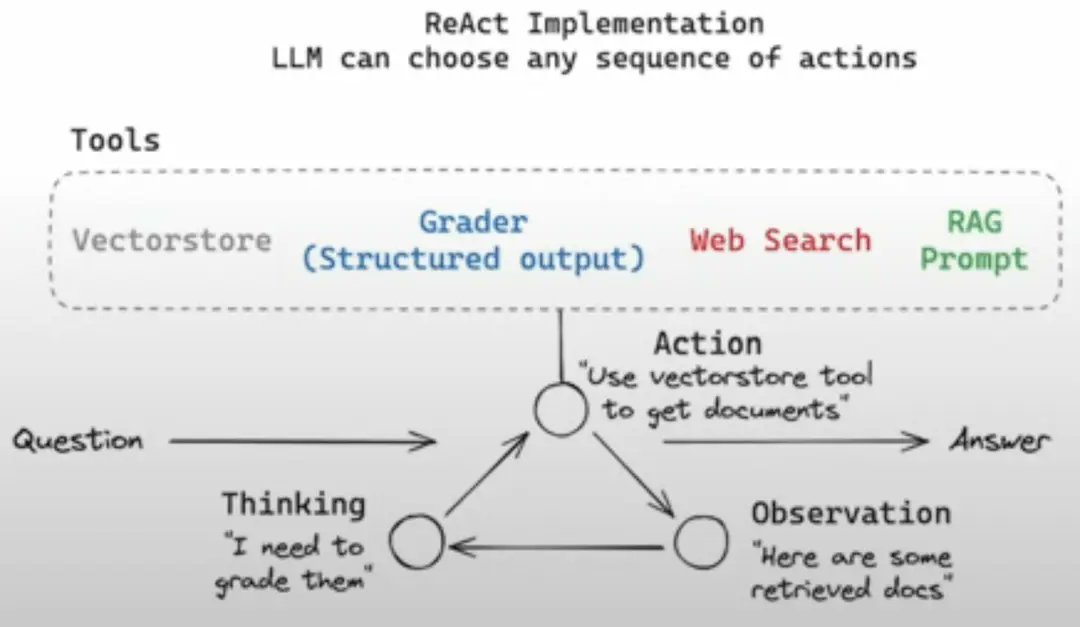
Implementing Advanced RAG Features with LangGraph#
This section focuses on implementing advanced RAG features, including hallucination and answer grading, a router for directing questions, web search integration, and the overall control flow using LangGraph.
To enhance our RAG system, we incorporate several advanced features. First, we implement a retrieval grader that assesses the relevance of retrieved documents to a given user question. This is achieved using a ChatOllama model with a specific prompt, instructing the LLM to return a JSON with a score of yes or no.
from langchain_community.chat_models import ChatOllama
from langchain_core.output_parsers import JsonOutputParser
from langchain_core.prompts import PromptTemplate

# LLM
llm = ChatOllama(model=local_llm, format="json", temperature=0)

prompt = PromptTemplate(
    template="""<|begin_of_text|><|start_header_id|>system<|end_header_id|> You are a grader assessing relevance
    of a retrieved document to a user question. If the document contains keywords related to the user question,
    grade it as relevant. It does not need to be a stringent test. The goal is to filter out erroneous retrievals. \n
    Give a binary score 'yes' or 'no' score to indicate whether the document is relevant to the question. \n
    Provide the binary score as a JSON with a single key 'score' and no premable or explanation.
     <|eot_id|><|start_header_id|>user<|end_header_id|>
    Here is the retrieved document: \n\n {document} \n\n
    Here is the user question: {question} \n <|eot_id|><|start_header_id|>assistant<|end_header_id|>
    """,
    input_variables=["question", "document"],
)

retrieval_grader = prompt | llm | JsonOutputParser()
question = "agent memory"
docs = retriever.invoke(question)
doc_txt = docs[1].page_content
print(retrieval_grader.invoke({"question": question, "document": doc_txt}))
Next, we need a generator to produce concise answers using the context from the retrieved documents. This involves a prompt template that instructs the LLM to answer the question using the provided context, limiting the answer to three sentences.
from langchain_core.output_parsers import StrOutputParser
from langchain_core.prompts import PromptTemplate

# Prompt
prompt = PromptTemplate(
    template="""<|begin_of_text|><|start_header_id|>system<|end_header_id|> You are an assistant for question-answering tasks.
    Use the following pieces of retrieved context to answer the question. If you don't know the answer, just say that you don't know.
    Use three sentences maximum and keep the answer concise <|eot_id|><|start_header_id|>user<|end_header_id|>
    Question: {question}
    Context: {context}
    Answer: <|eot_id|><|start_header_id|>assistant<|end_header_id|>""",
    input_variables=["question", "document"],
)

llm = ChatOllama(model=local_llm, temperature=0)


# Post-processing
def format_docs(docs):
    return "\n\n".join(doc.page_content for doc in docs)


# Chain
rag_chain = prompt | llm | StrOutputParser()

# Run
question = "agent memory"
docs = retriever.invoke(question)
generation = rag_chain.invoke({"context": docs, "question": question})
print(generation)
To ensure the quality of generated content, we implement two graders: a hallucination grader and an answer grader. The hallucination grader checks if the generated answer is grounded in the provided documents, while the answer grader assesses if the answer is useful in resolving the question. Both graders return a binary score in JSON format.
# Hallucination Grader

# LLM
llm = ChatOllama(model=local_llm, format="json", temperature=0)

# Prompt
prompt = PromptTemplate(
    template=""" <|begin_of_text|><|start_header_id|>system<|end_header_id|> You are a grader assessing whether
    an answer is grounded in / supported by a set of facts. Give a binary 'yes' or 'no' score to indicate
    whether the answer is grounded in / supported by a set of facts. Provide the binary score as a JSON with a
    single key 'score' and no preamble or explanation. <|eot_id|><|start_header_id|>user<|end_header_id|>
    Here are the facts:
    \n ------- \n
    {documents}
    \n ------- \n
    Here is the answer: {generation}  <|eot_id|><|start_header_id|>assistant<|end_header_id|>""",
    input_variables=["generation", "documents"],
)

hallucination_grader = prompt | llm | JsonOutputParser()
hallucination_grader.invoke({"documents": docs, "generation": generation})

### Answer Grader

# LLM
llm = ChatOllama(model=local_llm, format="json", temperature=0)

# Prompt
prompt = PromptTemplate(
    template="""<|begin_of_text|><|start_header_id|>system<|end_header_id|> You are a grader assessing whether an
    answer is useful to resolve a question. Give a binary score 'yes' or 'no' to indicate whether the answer is
    useful to resolve a question. Provide the binary score as a JSON with a single key 'score' and no preamble or explanation.
     <|eot_id|><|start_header_id|>user<|end_header_id|> Here is the answer:
    \n ------- \n
    {generation}
    \n ------- \n
    Here is the question: {question} <|eot_id|><|start_header_id|>assistant<|end_header_id|>""",
    input_variables=["generation", "question"],
)

answer_grader = prompt | llm | JsonOutputParser()
answer_grader.invoke({"question": question, "generation": generation})
A router is implemented to direct questions to either a vector store or web search based on the content of the question. The router uses an LLM to decide whether a question is related to specific topics (LLM agents, prompt engineering, or adversarial attacks) and routes it accordingly.
# Router

from langchain_community.chat_models import ChatOllama
from langchain_core.output_parsers import JsonOutputParser
from langchain_core.prompts import PromptTemplate

# LLM
llm = ChatOllama(model=local_llm, format="json", temperature=0)

prompt = PromptTemplate(
    template="""<|begin_of_text|><|start_header_id|>system<|end_header_id|> You are an expert at routing a
    user question to a vectorstore or web search. Use the vectorstore for questions on LLM  agents,
    prompt engineering, and adversarial attacks. You do not need to be stringent with the keywords
    in the question related to these topics. Otherwise, use web-search. Give a binary choice 'web_search'
    or 'vectorstore' based on the question. Return the a JSON with a single key 'datasource' and
    no premable or explanation. Question to route: {question} <|eot_id|><|start_header_id|>assistant<|end_header_id|>""",
    input_variables=["question"],
)

question_router = prompt | llm | JsonOutputParser()
question = "llm agent memory"
docs = retriever.get_relevant_documents(question)
doc_txt = docs[1].page_content
print(question_router.invoke({"question": question}))
For questions that require information outside of the vector store, a web search tool is integrated using the Tavily Search API. This tool fetches the top 3 search results for a given query.
# Search
from langchain_community.tools.tavily_search import TavilySearchResults
web_search_tool = TavilySearchResults(k=3)
Finally, the entire workflow is orchestrated using LangGraph, which allows us to define a stateful, graph-based workflow. The graph includes nodes for retrieval, generation, grading, and web search. Conditional edges are used to control the flow based on the results of each step, ensuring that the system can adapt to different types of questions and generate high-quality answers.
from pprint import pprint
from typing import List

import time

from langchain_core.documents import Document
from typing_extensions import TypedDict

from langgraph.graph import END, StateGraph

# State


class GraphState(TypedDict):
    """
    Represents the state of our graph.

    Attributes:
        question: question
        generation: LLM generation
        web_search: whether to add search
        documents: list of documents
    """

    question: str
    generation: str
    web_search: str
    documents: List[str]


# Nodes


def retrieve(state):
    """
    Retrieve documents from vectorstore

    Args:
        state (dict): The current graph state

    Returns:
        state (dict): New key added to state, documents, that contains retrieved documents
    """
    print("---RETRIEVE---")
    question = state["question"]

    # Retrieval
    documents = retriever.invoke(question)
    return {"documents": documents, "question": question}


def generate(state):
    """
    Generate answer using RAG on retrieved documents

    Args:
        state (dict): The current graph state

    Returns:
        state (dict): New key added to state, generation, that contains LLM generation
    """
    print("---GENERATE---")
    question = state["question"]
    documents = state["documents"]

    # RAG generation
    generation = rag_chain.invoke({"context": documents, "question": question})
    return {"documents": documents, "question": question, "generation": generation}


def grade_documents(state):
    """
    Determines whether the retrieved documents are relevant to the question
    If any document is not relevant, we will set a flag to run web search

    Args:
        state (dict): The current graph state

    Returns:
        state (dict): Filtered out irrelevant documents and updated web_search state
    """

    print("---CHECK DOCUMENT RELEVANCE TO QUESTION---")
    question = state["question"]
    documents = state["documents"]

    # Score each doc
    filtered_docs = []
    web_search = "No"
    for d in documents:
        score = retrieval_grader.invoke(
            {"question": question, "document": d.page_content}
        )
        grade = score["score"]
        # Document relevant
        if grade.lower() == "yes":
            print("---GRADE: DOCUMENT RELEVANT---")
            filtered_docs.append(d)
        # Document not relevant
        else:
            print("---GRADE: DOCUMENT NOT RELEVANT---")
            # We do not include the document in filtered_docs
            # We set a flag to indicate that we want to run web search
            web_search = "Yes"
            continue
    return {"documents": filtered_docs, "question": question, "web_search": web_search}


def web_search(state):
    """
    Web search based based on the question

    Args:
        state (dict): The current graph state

    Returns:
        state (dict): Appended web results to documents
    """

    print("---WEB SEARCH---")
    question = state["question"]
    documents = state["documents"]

    # Web search
    docs = web_search_tool.invoke({"query": question})
    web_results = "\n".join([d["content"] for d in docs])
    web_results = Document(page_content=web_results)
    if documents is not None:
        documents.append(web_results)
    else:
        documents = [web_results]
    return {"documents": documents, "question": question}


# Conditional edge


def route_question(state):
    """
    Route question to web search or RAG.

    Args:
        state (dict): The current graph state

    Returns:
        str: Next node to call
    """

    print("---ROUTE QUESTION---")
    question = state["question"]
    print(question)
    source = question_router.invoke({"question": question})
    print(source)
    print(source["datasource"])
    if source["datasource"] == "web_search":
        print("---ROUTE QUESTION TO WEB SEARCH---")
        return "websearch"
    elif source["datasource"] == "vectorstore":
        print("---ROUTE QUESTION TO RAG---")
        return "vectorstore"


def decide_to_generate(state):
    """
    Determines whether to generate an answer, or add web search

    Args:
        state (dict): The current graph state

    Returns:
        str: Binary decision for next node to call
    """

    print("---ASSESS GRADED DOCUMENTS---")
    state["question"]
    web_search = state["web_search"]
    state["documents"]

    if web_search == "Yes":
        # All documents have been filtered check_relevance
        # We will re-generate a new query
        print(
            "---DECISION: ALL DOCUMENTS ARE NOT RELEVANT TO QUESTION, INCLUDE WEB SEARCH---"
        )
        return "websearch"
    else:
        # We have relevant documents, so generate answer
        print("---DECISION: GENERATE---")
        return "generate"


# Conditional edge


def grade_generation_v_documents_and_question(state):
    """
    Determines whether the generation is grounded in the document and answers question.

    Args:
        state (dict): The current graph state

    Returns:
        str: Decision for next node to call
    """

    print("---CHECK HALLUCINATIONS---")
    question = state["question"]
    documents = state["documents"]
    generation = state["generation"]

    score = hallucination_grader.invoke(
        {"documents": documents, "generation": generation}
    )
    grade = score["score"]

    # Check hallucination
    if grade == "yes":
        print("---DECISION: GENERATION IS GROUNDED IN DOCUMENTS---")
        # Check question-answering
        print("---GRADE GENERATION vs QUESTION---")
        score = answer_grader.invoke({"question": question, "generation": generation})
        grade = score["score"]
        if grade == "yes":
            print("---DECISION: GENERATION ADDRESSES QUESTION---")
            return "useful"
        else:
            print("---DECISION: GENERATION DOES NOT ADDRESS QUESTION---")
            return "not useful"
    else:
        pprint("---DECISION: GENERATION IS NOT GROUNDED IN DOCUMENTS, RE-TRY---")
        return "not supported"


workflow = StateGraph(GraphState)

# Define the nodes
workflow.add_node("websearch", web_search)  # web search
workflow.add_node("retrieve", retrieve)  # retrieve
workflow.add_node("grade_documents", grade_documents)  # grade documents
workflow.add_node("generate", generate)  # generatae
# Build graph
workflow.set_conditional_entry_point(
    route_question,
    {
        "websearch": "websearch",
        "vectorstore": "retrieve",
    },
)

workflow.add_edge("retrieve", "grade_documents")
workflow.add_conditional_edges(
    "grade_documents",
    decide_to_generate,
    {
        "websearch": "websearch",
        "generate": "generate",
    },
)
workflow.add_edge("websearch", "generate")
workflow.add_conditional_edges(
    "generate",
    grade_generation_v_documents_and_question,
    {
        "not supported": "generate",
        "useful": END,
        "not useful": "websearch",
    },
)
By combining these components, we have created a robust RAG system that not only retrieves relevant information but also ensures the quality and reliability of the generated answers.
Conclusion#
In this tutorial, we’ve explored the process of building a local Retrieval Augmented Generation (RAG) agent using Elasticsearch, LangGraph, and Llama3. We demonstrated how to index your data into Elasticsearch, construct a LangGraph workflow for querying, and integrate Llama3 for generating responses. The key takeaway is that you can create a powerful, locally-run RAG system by combining these technologies.
We encourage you to experiment with the provided code, adapt it to your specific needs, and explore the various configuration options available within Elasticsearch, LangGraph, and Llama3. For further exploration, refer to the original blog post, Local RAG Agent with Elasticsearch, LangGraph and Llama3, which provides additional context and insights into the design choices. This tutorial serves as a starting point, and the possibilities for customization and enhancement are vast.
Comments
comments powered by Disqus